
Container haulage article
3 Rules to Choose Email or Portal Updates for Logistics Teams
Decide per task whether to use email, a portal, or a hybrid with a three-factor checklist: sensitivity, stakeholders, and repeatability. Includes portal...
Use email for short, one-off messages and exceptions; use a portal for anything structured, repeatable, or shared across several people. The rule of thumb comes down to three factors: sensitivity of the information, how many people need to see it, and whether the same task repeats. Get those three right and the channel choice makes itself.
HaulierMake Container Transport EasierHaulier.AI connects freight teams with trustworthy UK hauliers through clear, AI-assisted and human-backed transport coordination.Visit Haulier.AITL;DR:
- Portals excel for managing structured, repeatable workflows involving multiple stakeholders and requiring document version control or activity logs.
- Email remains suitable for quick, informal, one-off messages with low sensitivity and small groups, but struggles with attachments, traceability, and scaling.
- Security and compliance favors portals through role-based access and audit trails, while email is vulnerable and less scalable for sensitive information.
- Conducting a pilot on one recurring process can demonstrate how shifting from email to a portal reduces follow-up chatter and speeds up completion times.
- Use a checklist considering sensitivity, stakeholder count, repetition, file type, and audit needs to decide whether to use email, portal, or a hybrid approach.
Table of Contents
- When is email the right choice for updates?
- What does a portal update actually look like?
- How do email and portals compare on security and scale?
- When is email still enough?
- How do you decide: email, portal, or hybrid?
- How do you get people to actually use the portal?
- How does this play out in logistics?
- Why a hybrid pattern usually wins
- Another option worth knowing about
- Sources
- FAQ
When is email the right choice for updates?
Email still wins for anything quick, informal, or genuinely one-off. A short confirmation, a scheduling tweak, a “can you check this before Friday” message: email handles these better than any portal because there’s no login, no interface to learn, and everyone already has an inbox open.
That universal access is the real strength. You don’t need to onboard a client onto a new system to tell them their delivery slipped by a day. Email is low friction, works from any device, and is genuinely good for the back-and-forth of ad-hoc conversation that doesn’t need a permanent record.
The limits show up once volume or complexity rises:
- Attachments get buried three replies deep in a thread nobody can find again
- There’s no reliable audit trail of who saw what, or when
- Long threads fork into confusing sub-conversations with inconsistent subject lines
- Version control on documents attached to email is effectively nonexistent
Email is a conversation tool. It was never built to be a system of record, and treating it as one is where most of the pain starts.
What does a portal update actually look like?
A portal update centres on a single file, shipment, or case record rather than a scattered inbox thread. A typical customer portal covers real-time status, a document library, in-app messaging tied to the file, alerts and role-based permissions, which together replace the constant “can you send me an update” emails that otherwise pile up.
That’s the core shift: instead of reconstructing status from five different email chains, everyone looks at the same record. Document collection, approvals, and version control all sit in one place, with role-based access controlling who can see or edit what.
Portals work best as the system of record when you need:
- Multi-stakeholder workflows, where three or more people need visibility on the same task
- Regulated document handling, where you need proof of who approved what and when
- Repeated approvals, the kind of process that happens weekly or monthly, not once
- Structured status fields and activity logs rather than free-text updates
A client portal should handle the repeatable tasks such as document requests, status checks, and approvals, leaving email for exceptions and informal conversation. That division of labour is the whole point.
Pro Tip: If you’re weighing up whether to build or buy a portal, look at the three tasks a shipper actually repeats: checking current status, downloading a document, and reading the message thread on a specific file. Get those three right first and adoption tends to follow on its own.
How do email and portals compare on security and scale?
Security is where the gap between the two channels widens fastest. The ICO’s guidance on data sharing sets out clear expectations for handling personal data as it moves between systems, and email rarely meets that bar without extra controls. The ICO’s code of practice on data sharing is worth reading before you decide email is “good enough” for anything containing personal or commercially sensitive information.
Professional bodies go further. The ICAEW recommends secure portals for sending personal data and flags server location and staff training as ongoing concerns, not one-off setup tasks.
Here’s how the two channels actually differ once you line them up:
- Encryption and access control: portals typically enforce role-based permissions; email depends on whoever’s inbox it lands in
- Traceability: portals keep an activity log tied to a record; email leaves only a scattered thread history
- Scale: email coordination effort grows faster than the number of people involved, while a shared portal record doesn’t multiply the same way
- Cost and friction: email costs nothing upfront but accumulates hidden admin time; portals cost more to set up but flatten that curve
When operations lean on email as their de facto system of record, coordination work stops scaling in a straight line, and structured notifications can cut routine email volume substantially once teams move that shared state out of the inbox.
When is email still enough?
Not every process justifies a portal. Email remains the right call for small, occasional exchanges where there’s no repeat pattern and nothing sensitive changes hands.
- One-off or rare tasks. If something happens twice a year, building a workflow around it rarely pays back the effort.
- Low-sensitivity content. General scheduling or informal check-ins don’t need audit trails.
- Small groups. Two or three people on a thread is manageable; ten is not.
Before jumping to a full portal build, structured and automated email, milestone-based notifications, or validated attachment rules can resolve a lot of the friction on their own. The ICO’s wider guidance on data sharing is a sensible checkpoint for anyone tightening up email practice as an interim step, rather than jumping straight to custom software.
How do you decide: email, portal, or hybrid?
Run any recurring process through this checklist before assigning it a channel:
- Check sensitivity. Does the update contain personal, financial, or commercially confidential data? If yes, lean portal.
- Count stakeholders. Two people, email is fine. Four or more with different roles, that’s a portal case.
- Ask if it repeats. A one-off exchange stays in email. Anything that happens weekly deserves a structured home.
- Check for file types. Documents needing versioning or approval sign-off belong in a portal, not an attachment.
- Decide if you need an audit trail. If you’ll ever need to prove who saw or approved something, a portal’s activity log settles that instantly; an email thread rarely does.
A useful metric once you’ve made the call: track the number of “just checking in” chaser messages before and after the switch. Firms adopting portals often notice the admin pain first, before they even frame it as a security issue, missing files, duplicate uploads, unclear ownership.
The lowest-risk way to test this is a single pilot: pick one recurring process, move it to a portal, and measure chasers and time-to-completion over a month before rolling it out further.
How do you get people to actually use the portal?
Adoption is the part most rollouts get wrong. It depends on the portal being genuinely useful, easy to sign into, and paired with a firm rule about what must be completed there rather than by email.
- Make the portal the only place tasks can actually be closed out; keep email strictly for notifications and links back to it
- Use single-click entry links so people aren’t hunting for a password every time
- Set upload validation so files land in the right place the first time, not in a follow-up email
- Give new users a short onboarding template and automated nudges rather than assuming they’ll find their way
Pro Tip: Escalation matters more than onboarding. If a task sits untouched for 48 hours, an automated role-based reminder does more for adoption than any training session ever will.
How does this play out in logistics?
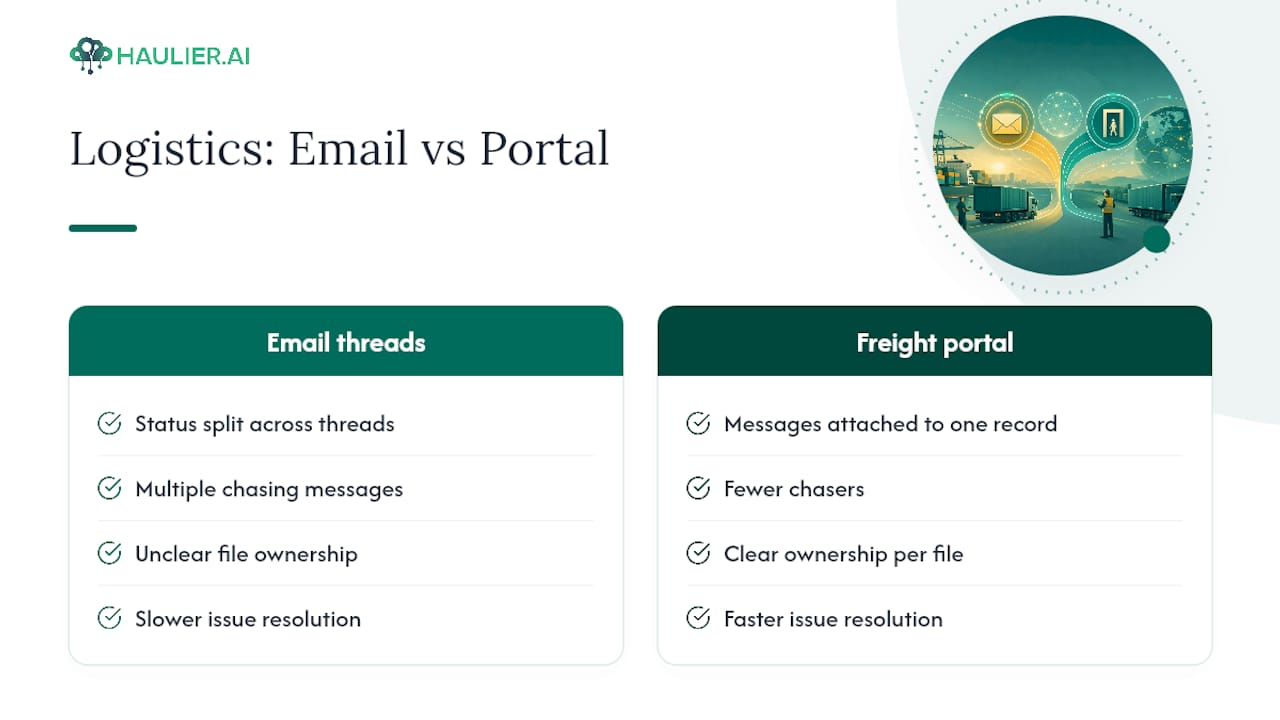
A freight portal that attaches messages and documents to a single shipment record removes the need to reconstruct status from five email threads. That’s the practical gain: fewer chasers, clearer ownership of each file, and faster resolution when something needs checking. Haulier’s own approach to structured updates follows the same logic, and readers weighing this up for container transport specifically can see how missed updates get avoided in more operational detail.
Why a hybrid pattern usually wins
Most teams don’t need to pick a side. The pattern that actually works is moving shared state, status, documents, approvals, into a portal and leaving email for alerts and genuine exceptions. It respects how people already work while giving the operation a proper record underneath.
Start with one process. Measure the chaser count and time-to-completion before you expand it anywhere else. That evidence beats any argument about which channel is “better” in the abstract.
— Vytautas
Another option worth knowing about
If your team’s version of this problem is container haulage specifically, missed ETA updates, chased paperwork, capacity that’s hard to pin down, Haulier is built around the same principle this article argues for: put shared state in one place, and keep email for the exceptions.
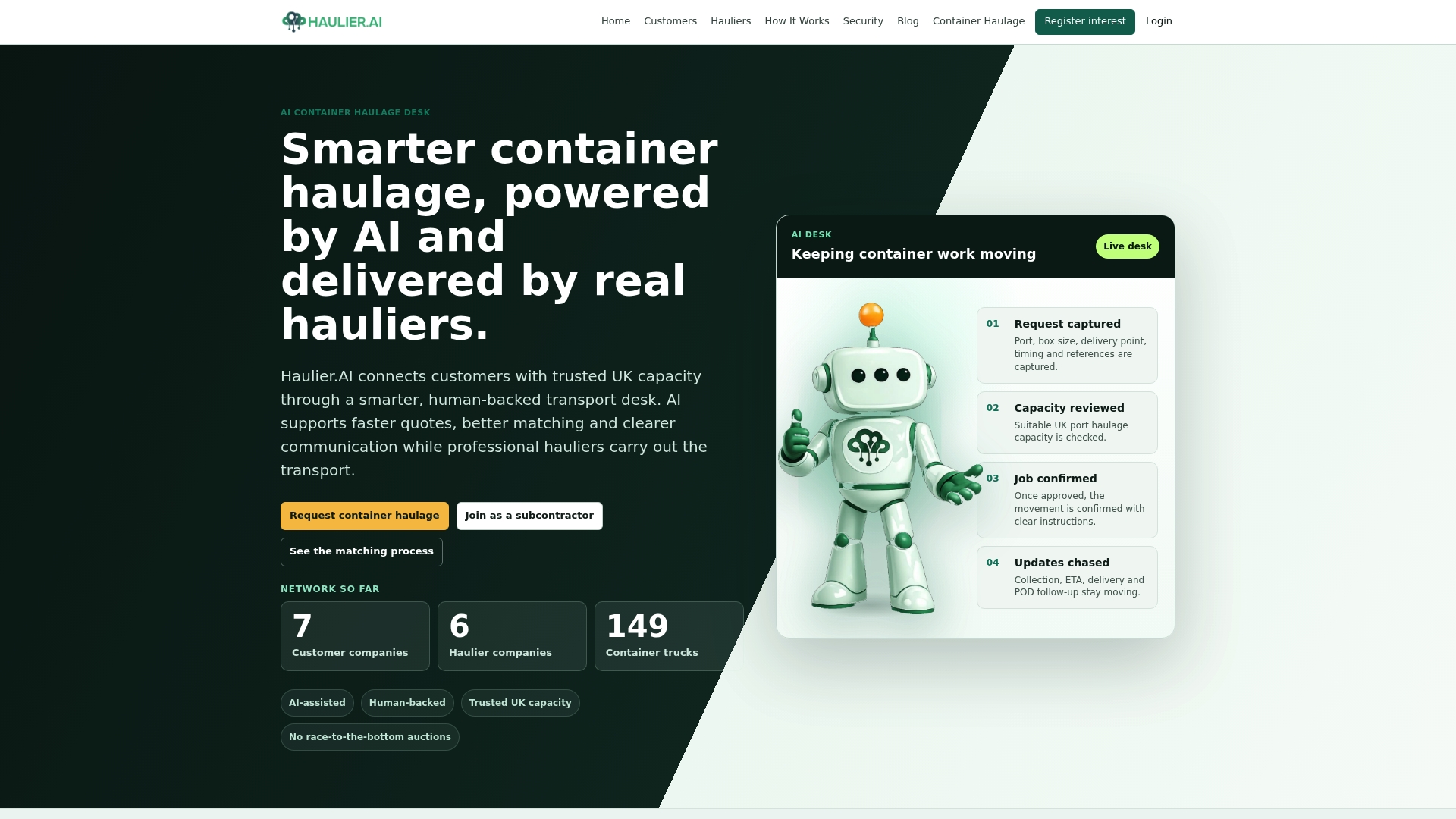
Rather than running haulage bookings through scattered email chains, a platform can connect freight forwarders and importers to UK hauliers through an AI-assisted, human-backed transport desk, with quoting, paperwork tracking, and status updates centralised so nobody’s chasing a driver by phone to find out where a container is. Hauliers keep control of their own rates and can turn down jobs that don’t fit, which helps maintain fair pricing. If you’re tired of reconstructing shipment status from five different threads, you can request container haulage and see how the desk handles a live job, or check Teesport container haulage coverage if that’s your lane.
Sources
For anyone tightening up data-handling practice before choosing a channel, the ICO’s code of practice on data sharing is the primary UK reference point, alongside ICAEW’s guidance on communicating safely with clients. For a broader look at freight and forwarding options, ORNER’s comparison of freight forwarding services is a useful companion read.
- ICO — Data sharing: a code of practice
- Advizo — Client portal versus email for advisers
- GoFreight — Customer portal features
- OVRSEA — Managing your transport without email
FAQ
Is email becoming obsolete?
No. Email remains the right tool for short, informal, one-off communication; it’s being replaced specifically for structured, repeatable, multi-party work, not wholesale.
Is a secure portal safer than email?
Generally yes, when set up properly. A portal with role-based permissions and an activity log gives far better traceability than an email thread, though the ICO still expects careful configuration and staff training on both sides.
What is the 3-email rule?
There’s no single official “3-email rule”; the phrase is used informally to suggest that if a topic takes more than three email replies to resolve, it should move to a call, meeting, or shared record instead.
What is the most hacked email service?
There’s no definitive public ranking of the “most hacked” email provider, since breach data varies by year and disclosure practice. The safer question is whether your workflow needs email-level security at all, or whether sensitive files belong in a controlled portal instead.
How do I know if my team should move a process to a portal?
If the task repeats regularly, involves more than two or three stakeholders, or requires an audit trail, it belongs in a portal rather than an inbox.