
Container haulage article
Fill Jobs Faster: Forwarder Transport Desk That Gets Offers in an Hour
Practical steps to post complete jobs, shortlist 3–5 hauliers, name the owning desk, track milestones, and use an AI assisted desk.
A forwarder transport desk exists to turn a booking into a moving container with no gaps in visibility, and the fastest way to succeed with one is simple: post a fully specified job and name the desk that owns it before you post anything else. FIATA calls the freight forwarder the “architect of transport”, and a well-run desk is where that architecture gets tested daily, tools like Haulier.AI included.
HaulierFill Container Jobs FasterHaulier.AI connects you with trustworthy UK hauliers through an AI-assisted, human-backed transport desk with clear process visibility.Explore Haulier.AITL;DR:
- Posting fully specified jobs with clear route, timing, and equipment details reduces rejection risks, delays, and miscommunications during operations.
- Prioritizing equipment match, port coverage, recent activity, and response times helps quickly identify the most reliable hauliers for any lane.
- Integrating the desk with warehouse and finance systems accelerates customs clearance, reduces paperwork errors, and improves real-time visibility of job status.
- Establishing clear authority limits and automating milestone tracking enables rapid decision-making, especially after hours, to maintain momentum.
- Maintaining an up-to-date, vetted Directory and standardizing communication practices improve operational efficiency and reduce delays from capacity gaps and miscommunication.
Table of Contents
- How to post work on a forwarder transport desk
- How do you find available hauliers on the desk?
- How do you track and manage jobs in progress?
- How does the Directory help manage haulier contacts?
- How do you use the Diary for scheduling and slots?
- How do desks find work through marketplace matching?
- Best practices for desk to haulier communication
- Common challenges in transport desk operations
- Integrating the transport desk with WMS and ERP systems
- Security and compliance for transport job data
- Reporting and analytics that improve desk performance
- What does a transport desk operator actually do?
- Operational ownership: which desk should own a shipment?
- How Haulier.AI puts this into practice
- Sources
- FAQ
How to post work on a forwarder transport desk
A job posted with gaps costs you time twice: once when a haulier asks for the missing detail, and again when the wrong one accepts it. Good software separates these fields deliberately rather than lumping them into a free text box, which is one reason buyer guidance for forwarding platforms points to dedicated modules for air, sea, road, courier and customs handling rather than one generic job form.
Before publishing any job, work through this order:
- Route and container details — origin, destination, container type and weight. Vague routing is the single biggest cause of rejected offers.
- Equipment requirements — chassis type, tail lift, ADR certification if the cargo demands it.
- Timings — a realistic collection window, not an aspirational one. Hauliers plan around windows, not wishes.
- Documentation — customs references, port booking numbers, delivery instructions attached as files, not typed into notes.
- Standing authority — who can approve a rate variation or delay without escalating to a manager.
Tag jobs with searchable terms (port name, container size, ADR class) so hauliers scanning the board find relevant work instantly rather than opening every listing.
Pro Tip: Set your time window wider than the theoretical minimum. A tight window looks efficient on paper but forces every haulier to reject it the moment traffic or port congestion intervenes.
How do you find available hauliers on the desk?
Speed of match beats breadth of broadcast. A job pushed to 40 hauliers usually gets ignored by all of them; a job pushed to five who cover that lane and hold the right equipment gets answered within the hour. The filters that matter most:
- Equipment match — container type and any specialist gear, filtered first, not last.
- Port coverage — hauliers who have worked that terminal recently clear it faster than ones learning the access rules on the day.
- Recent acceptance rate — a haulier who has accepted and completed similar jobs in the last fortnight is a safer bet than one who last worked with you three months ago.
- Response time metrics — a haulier averaging a 20-minute reply beats one who averages four hours, even if their rate is marginally better.
Build a shortlist of three to five before you message anyone, and use a short, consistent template: route, container, window, rate ceiling. Consistency here speeds up haulier decision making because they are not deciphering a different format every time.
The main red flag to avoid is over broadcasting every job to your entire network out of habit. It trains hauliers to ignore your postings, and it sidelines the vetted partners who deserve first look at good work.
Pro Tip: Message your top three vetted hauliers directly before opening a job to the wider board. You will often fill it before the broadcast even goes out.
How do you track and manage jobs in progress?
The desk’s job does not end at booking. It ends at proof of delivery, reconciled paperwork, and a closed file. Track these milestones as standard: job accepted, container collected, in transit, arrived at destination, unloaded, POD received, invoice matched.
- Set milestone checkpoints that trigger automatically rather than relying on a haulier to remember to call in.
- Define escalation paths — who gets notified at each delay threshold, and who has authority to reroute or rebook without waiting for sign off.
- Log exceptions as they happen, not at end of day, so the reason for a delay is accurate rather than reconstructed from memory.
- Reconcile the job on closure — POD, invoice, and any variance against the original quote, filed together.
Integration cuts admin sharply. Case studies on ERP and customs system integration show clearance processes that once took days can shrink to hours once systems talk to each other automatically, as shown in this example. The same logic applies to diaries and tracking screens: when they are aligned, manual chasing drops noticeably because the desk sees drift the moment it happens rather than at the next phone call.
How does the Directory help manage haulier contacts?
A Directory is only useful if it is more current than your memory. The desk that maintains one well saves the ten minutes per job that would otherwise go into re-checking insurance documents or re-asking which ports a haulier covers.
- Core fields: equipment types held, port and lane coverage, insurance expiry, and any operational notes (loading dock access issues, preferred collection times).
- Vetting cadence: review insurance and compliance documents at least quarterly, not just at onboarding, since certificates lapse quietly.
- Tags that actually get used: container size, ADR capability, and reliability notes from past jobs, so a search returns hauliers who fit, not just hauliers who exist.
- Integrations remove duplicate entry: a Directory that feeds job postings automatically stops the desk retyping haulier details every single time a job goes out, which is also where platforms in adjacent fields, such as MoreShores’ fulfilment integrations, tend to add value for forwarders running multiple systems side by side.
How do you use the Diary for scheduling and slots?
Capacity planning fails most often not from lack of hauliers, but from too many jobs landing in the same three-hour window because nobody smoothed the load across the day.
- Set firm cut-off times for booking slots and hold to them. A cut off that bends every time trains customers to ignore it.
- Allocate slots against forecast demand, not just confirmed bookings, so a sudden Friday surge does not catch the desk short.
- Build recovery windows into the diary deliberately — a schedule with zero slack means one late container cascades into three missed ones.
- Use diary views for handovers so an evening shift can see exactly what the day shift committed to, without a phone call to reconstruct it.
Practical scheduling guidance on container delivery slot management covers this in more depth if your current diary process runs on spreadsheets.
How do desks find work through marketplace matching?
Two channels bring in work: direct relationships with regular customers, and marketplace boards where jobs get posted for any qualifying haulier to bid on. Knowing which to use, and when, protects your margins.
- Use direct outreach for repeat lanes where you already know the rate ceiling and the customer’s tolerance for timing. It is faster and needs no negotiation.
- Use marketplace matching for one off or unfamiliar lanes, where broadcasting to a wider qualified pool surfaces capacity you would not otherwise reach.
- Set a minimum rate rule before you start bidding, not after a job is halfway quoted. A desk without a floor rate ends up chasing volume at the expense of margin.
- Reject unsuitable offers cleanly and quickly. A haulier who takes ten minutes to decline is more useful to your reputation than one who accepts and cancels later.
Automated quoting speeds this considerably when it is built around real constraints rather than a flat markup. Quote automation done properly still needs a human check on unusual cargo or an unfamiliar port, but for standard lanes it removes most of the manual rekeying that eats a desk’s morning.
Pro Tip: Review declined offers weekly. A pattern of rejections on one lane usually means your rate assumption is wrong, not that hauliers are being difficult.
Best practices for desk to haulier communication
Most delays on a transport job are not caused by traffic or weather. They are caused by someone not knowing something someone else already knew. The fix is structural, not attitudinal.
Standardise your update cadence. A haulier should know, without asking, when the desk expects a status update: on collection, at any delay past 30 minutes, and on delivery. Publish that expectation once and hold everyone to it, rather than chasing case by case.
Use one channel for operational updates and keep it separate from rate negotiation. Mixing “where’s my container” messages with “can you do this for less” conversations in the same thread slows both down and creates confusion about what a message is actually asking for.
Confirm instructions in writing, even after a phone call. A verbal confirmation of a delivery time window is worthless if the haulier’s driver never received it in text. This is the single most common cause of missed collection windows reported anecdotally across forwarding operations, and it costs nothing to fix.
Give hauliers a genuine point of contact who can make small decisions, rather than routing every query through a general inbox that takes hours to answer. A haulier stuck at a gate needs an answer in minutes, not by end of day.
Finally, close the loop after every job, good or bad. A quick note on what went well, or what caused friction, builds the kind of working relationship that means your best hauliers pick up your phone first next time.
Common challenges in transport desk operations
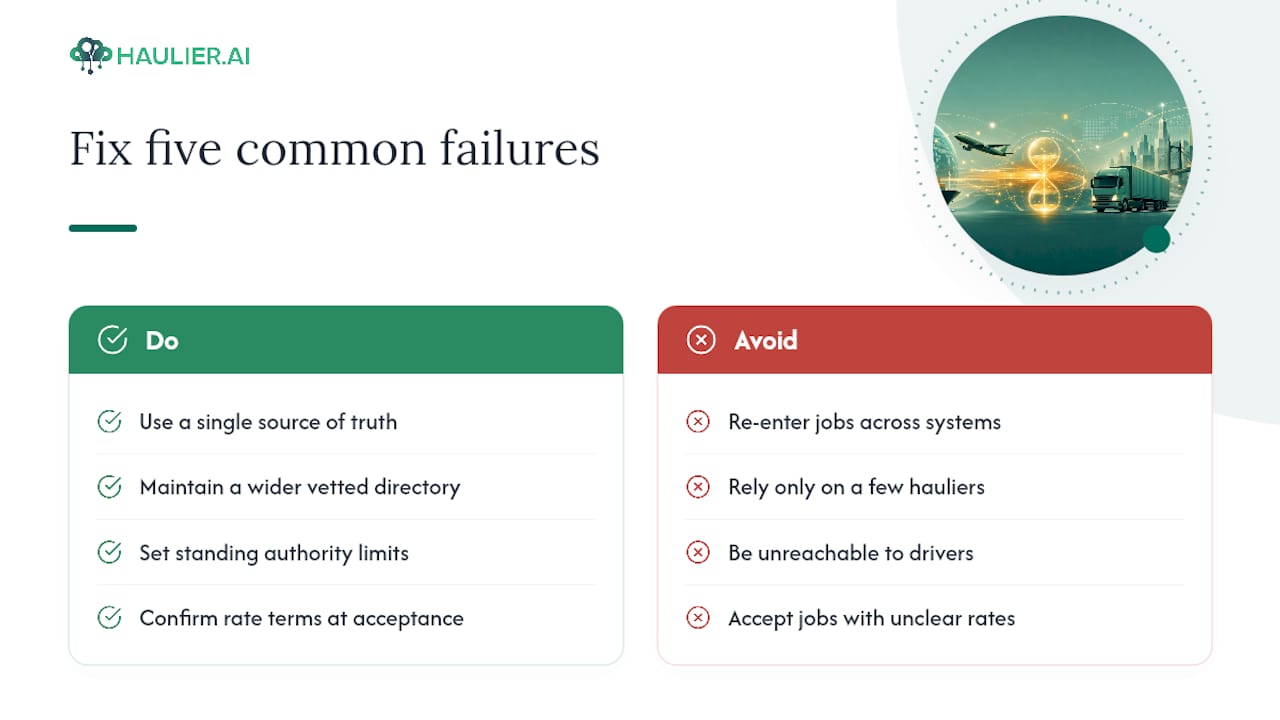
The most common failure point is duplicated effort: the same job re-entered into a spreadsheet, a booking system, and a customer update email, each one drifting slightly out of sync with the others. The fix is a single source of truth for job status that every tool reads from, rather than three versions maintained by hand.
The second is capacity blindness. Desks that rely on personal relationships with a handful of hauliers run smoothly until one of those hauliers is unavailable, at which point the whole desk stalls. Building and maintaining a wider vetted Directory, reviewed on a schedule rather than only when needed, solves this before it becomes urgent.
Communication breakdown ranks third. A driver who cannot reach the desk, or a desk that cannot reach a driver, turns a minor delay into a missed slot and an angry customer. Standing authority limits, discussed further below, exist specifically to stop small decisions from waiting on someone who is unreachable.
Rate disputes cause a disproportionate amount of friction given how avoidable they are. A haulier who accepts a job unclear on whether a detention charge applies will raise it after the fact, when it is harder to resolve fairly. Confirming rate terms, including contingencies, at the point of acceptance removes most of this.
Finally, paperwork drift, PODs collected late, documents filed under the wrong reference, invoices raised against the wrong job, tends to compound the closer a desk runs to capacity. The busier the desk, the more this discipline matters, not less.
Integrating the transport desk with WMS and ERP systems
A transport desk that operates in isolation from warehouse and finance systems generates work nobody asked for: someone retyping a job reference into an invoicing tool, someone else checking a delivery status by phone because the warehouse system has no visibility of it.
Integration with a warehouse management system lets the desk see stock readiness and slot bookings without a separate phone call to the warehouse team, which matters most at high volume sites where a missed handover costs real time. Integration with an ERP does the reverse: it pushes completed job data, cost, POD, invoice status, straight into finance without anyone rekeying figures.
The clearest evidence for the value of this comes from customs integration specifically. Case studies on ERP and customs-system connections show clearance workflows that once ran over multiple days compressed into hours once systems exchanged data automatically rather than through manual resubmission, as detailed here: link. Buyer guidance for forwarding software echoes this, treating customs handling as a core module rather than an add on, alongside operations, visibility, billing and analytics capabilities.
For UK forwarders specifically, CDS (Customs Declaration Service) support and terminal level integrations at major ports tend to matter more than generic connectivity claims, since a transport desk lives or dies on whether it can see real-time port and customs status rather than yesterday’s snapshot.
Security and compliance for transport job data
A transport job file carries commercially sensitive information: customer names, rate terms, cargo contents, and often personal data belonging to drivers. Treating that casually creates risk well beyond a missed delivery.
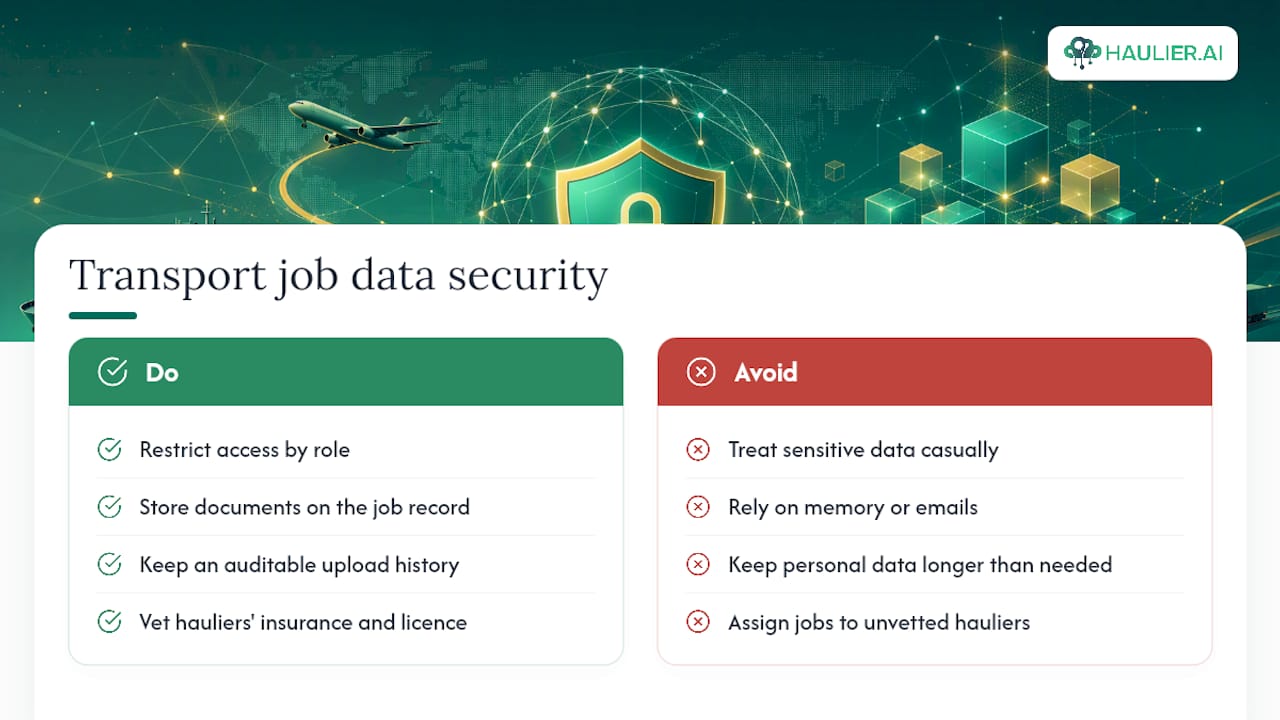
Access control matters first. Not every user on a transport desk needs visibility of every customer’s rate terms, and systems that separate viewing permissions by role reduce the chance of sensitive pricing leaking to the wrong haulier or competitor.
Document handling matters second. Customs paperwork, insurance certificates and PODs should be stored against the job record itself, with an audit trail showing who uploaded or altered them and when. A dispute over a missing POD is far easier to resolve when the system shows exactly when it was received, rather than relying on someone’s recollection of an email.
Data retention needs a clear policy too. Forwarders hold personal data on drivers and customer contacts, which falls under UK data protection obligations regardless of how small the desk is. Retaining data only as long as operationally necessary, and being able to show that policy on request, is not optional housekeeping, it is a basic compliance requirement.
Vetting hauliers on insurance and licensing before they touch live jobs closes the biggest practical gap. A haulier operating without current goods-in-transit cover is a liability the desk inherits the moment a job is assigned, whether or not that comes up in normal operation.
Reporting and analytics that improve desk performance
A transport desk running on gut feel eventually hits a ceiling, because gut feel cannot tell you which lane is quietly losing money or which haulier consistently runs late without anyone noticing the pattern.
The most useful reports are the simplest ones, tracked consistently. On time collection and delivery rates, broken down by haulier, expose which partners actually deliver versus which just promise well on the phone. Rate variance against quote flags lanes where your pricing assumptions are wrong before the losses stack up over a quarter. Response time to job postings tells you whether your Directory is genuinely current or whether half of it has stopped checking the board.
Analytics only earn their keep if someone actually reviews them on a schedule, weekly for operational metrics, monthly for margin and lane performance, rather than pulling a report only after something has already gone wrong. A desk that reviews haulier performance monthly catches a declining partner before a bad delivery costs a customer relationship, not after.
Buyer guidance for forwarding platforms lists analytics as a core capability alongside operations, visibility and billing, not a bolt-on feature, which reflects how central this has become to running a desk profitably rather than just busily.
What does a transport desk operator actually do?
The title covers more ground than most job descriptions admit. A transport desk operator posts and manages jobs, matches capacity to demand, tracks in-progress movements, and handles the exceptions that inevitably come up, a delayed vessel, a rejected offer, a missing document, in real time.
Day to day, the role splits roughly into three functions. The first is coordination: posting clear jobs, shortlisting hauliers, and confirming acceptance quickly enough that capacity does not slip to a competitor’s desk. The second is monitoring: watching milestones, catching drift before it becomes a missed delivery, and escalating only when a decision genuinely needs a manager’s authority. The third is administration: reconciling PODs, matching invoices, and keeping the Directory current enough that the next job moves faster than the last one.
FIATA’s description of the forwarder as the “architect of transport” applies just as directly to the desk operator role within a forwarding business, since the operator is the one actually assembling consolidation, documentation and route decisions into a working plan, rather than owning the vehicles themselves.
What separates a strong operator from an average one is rarely software skill. It is judgement on when to escalate, when to hold a haulier to a rate, and when to accept a slightly worse outcome to protect a longer relationship. No platform replaces that judgement, though the right one makes it easier to exercise consistently.
Operational ownership: which desk should own a shipment?
Naming the owning desk before a problem happens, not during one, is the single biggest lever a forwarder has over recovery speed. Practitioner case studies on recovery scenarios show that most delay comes from serial handoffs rather than the incident itself: three people calling three others before anyone actually acts.
Standing authority solves this. If a desk operator can approve a reroute or a rate variance up to an agreed limit without waiting for sign off, especially after hours, the response happens in minutes rather than after a manager wakes up. That authority needs a limit and a briefing template written in advance, not improvised at 11pm during an actual delay.
A human-backed desk earns its keep here specifically, because it can run customer contact and freight movement in parallel rather than one after the other. Automation scales the routine matching and tracking; a person with clear authority handles the exception the moment it appears, which is exactly where minutes get lost or saved.
— Vytautas
How Haulier.AI puts this into practice
A container haulage desk posts jobs with the fields that matter, matches to vetted hauliers quickly, and tracks progress without chasing updates by phone. The AI-assisted, human-backed model handles the routine matching and status tracking, while a person steps in the moment a job needs a judgement call, not a script.
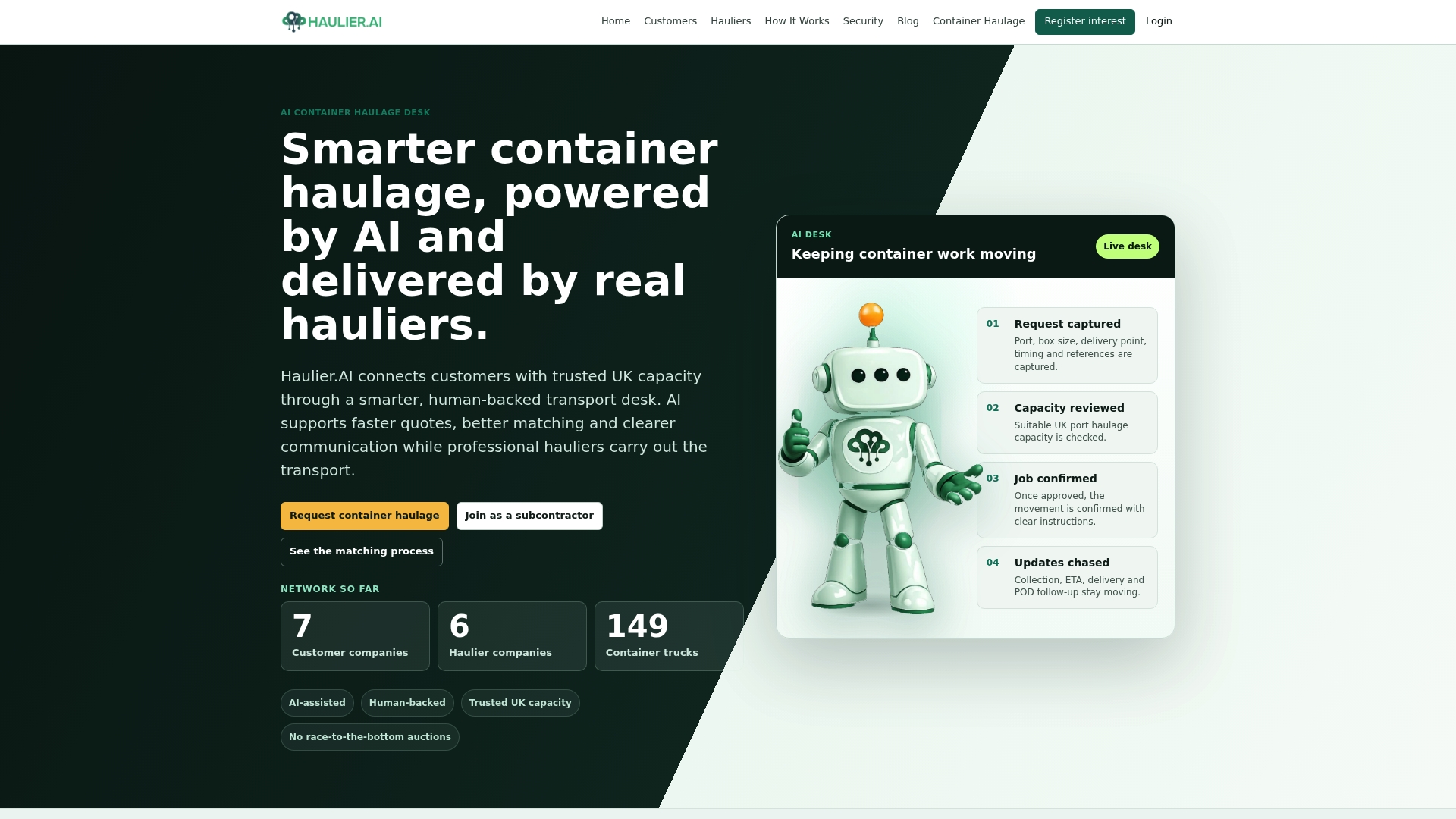
Hauliers can keep control of their own rates and reject jobs that do not suit their lanes or margins, which helps ensure that capacity offered matches interest. For forwarders, that translates into fewer missed updates, clearer quoting from the outset, and less time spent re-chasing PODs that should have arrived automatically. Coverage across major UK ports means most lanes are already served rather than needing a cold search for a new partner.
If your desk is still running job postings through spreadsheets and phone calls, request container haulage through Haulier for your next lane and see the difference a properly built desk makes to how fast a job gets covered.
Sources
- Gov
- About freight forwarding (FIATA)
- Freight Forwarding Software Buyer’s Guide 2026 (LogistiCore)
- Forwarder recovery: the desk called first vs the one that owns it (LAX Freight blog)
FAQ
What is a forwarder transport desk?
It is the operational function, whether one person or a team, that posts transport jobs, matches them to available haulier capacity, and tracks each movement through to proof of delivery and invoice reconciliation.
What does “forwarder” actually mean?
A freight forwarder coordinates the movement of goods on a customer’s behalf, handling consolidation, route planning, rate negotiation, customs paperwork and tracking, without owning the transport assets themselves.
What exactly does a freight forwarder do day to day?
A forwarder plans routes, negotiates rates with carriers, prepares customs documentation, arranges insurance, and tracks shipments end to end, acting as what FIATA calls the “architect of transport” rather than the vehicle operator.
Who is the biggest freight forwarder in the UK?
The UK freight forwarding sector includes several large international groups alongside a wide range of independent regional forwarders, and market position shifts often enough that no single name holds a fixed lead across every mode and lane.
What does a freight forwarder typically earn in the UK?
Freight forwarder salaries in the UK vary widely by seniority, specialism and location, with desk operators and coordinators typically earning less than senior forwarding managers or those running multi-mode operations.